Live2D Primer
Live2D Basics
These notes are a short orientation. For authoritative detail, use the Live2D Cubism manuals and file type reference.
What Is a Live2D Model?
A Live2D model is 2D artwork rigged for real-time motion: the art (for example a character) is cut into pieces/layers (hair strands, eyelashes, pupils, brows, ...) and each piece is placed onto a 2D mesh (the combination of the art image and the mesh is called "ArtMesh" in Live2D terms). Those meshes are driven by parameters (such as mouth open, head angle, or eye blink) either directly or through deformers (i.e. editor-defined transforms that describe how mesh deforms when a parameter changes).
The figure below uses eyelashes as an example of that pipeline:
- Full artwork — the flat illustration before it is split for rigging.
- Layered artwork — regions that move independently are separated onto their own layers.
- One layer — here, the eyelash artwork alone.
- Mesh — the eyelash art is placed on a 2D mesh (a grid of vertices the engine can warp).
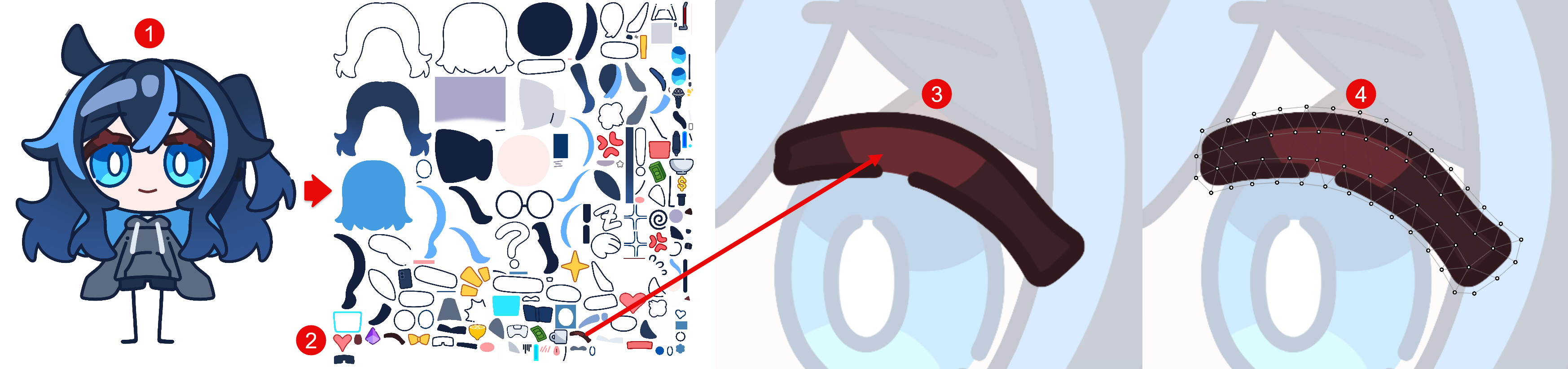
Changing parameter values moves those meshes, so the character can move, talk, and blink in a 3D-like way even though the asset is not a full 3D model.
Models are built in Live2D Cubism Editor and run in games or streaming apps via the Cubism SDK, which loads runtime data exported from the Live2D Cubism Editor. Usually the end user only needs to load the runtime data into the app and the app will handle the rest.
In this guide, we will use VTube Studio since it is the most widely used face-tracking app for streaming using Live2D models. Other software that supports Live2D models can also work, but this guide does not cover those tools. If you use other software, please check its supported Live2D format/version first.
It is not a comprehensive VTube Studio manual. If you are new to VTS, read the official manual first and try basic features with free sample models.
Runtime Files vs Editable Source
When you buy or download a model for use in VTube Studio or games, you almost always receive runtime (embedded) data—what the app loads at runtime—not the full Cubism Editor project.
Runtime Data
Runtime data is what engines and apps use to display the model. A typical package includes:
.moc3— Compiled model: meshes, parameters, deformers, and other rig data the runtime reads..model3.json— Tells the app how the files fit together.- Textures — Image files (e.g.
.png) mapped onto the meshes. .physics3.json— Physics / secondary motion data..cdi3.json— Display names for parameters and parts.*.motion3.json— Exported motions (see Live2D animation below).*.exp3.json— Exported expressions (see Live2D expression below).
That is the bundle you drop into VTube Studio, Unity, or any integration built on the Cubism SDK.
Editable Source/Project Files
Editable source/project files are what artists use in Live2D Cubism Editor:
- Model art (e.g. PSDs)
- Model workspace (
.cmo3) - Animation workspace (
.can3) - The rest of the project folder used to rig, animate, and export runtime data
Most Live2D model packages for sale include runtime data only. That is usually everything an end user needs to use the model in supported apps (e.g. VTube Studio).
Editable source files (project .cmo3, layered art, etc.) are often not part of the distribution. Keeping source private limits how the rig and artwork can be rebuilt or repurposed in ways the artist or rigger does not want.
Some listings do ship source; that should be clearly labeled (for example “source included”, *“.cmo3 / learning files included”). Those builds are often aimed at other Live2D creators as learning material. Always read the product description so you know which tier you are buying.
What Is a Live2D Expression (*.exp3.json)?
An expression is a preset snapshot of parameter values saved as a .exp3.json file. Loading an expression applies those values to the model. For example a fixed smile, closed eyes, or a “customization” state of the model. Toggle expressions/emotes/stickers are all expressions.
What Is a Live2D Animation (*.motion3.json)?
A motion is keyframed animation. How the parameters change over time is stored in the .motion3.json file. Motions are used for things like sticker animation, tail swaying, etc. They play on a timeline instead of being a single static preset like an expression.
What Is a Live2D Texture?
In Live2D, a texture is a 2D image file (commonly .png) that stores the flattened image of the character.
Authors usually draw in layers (for example in Photoshop as a PSD). In Live2D Cubism Editor, those layers become ArtMeshes: each mesh has UV coordinates that point to a region of the textures. At export time, the editor packs many parts onto one or a few larger images called texture atlases so the game or VTube Studio can draw the whole model efficiently.
For you as a user, the important ideas are:
- What you see on screen is the rendered result of the sampled pixels from these images as meshes move and deform.
- Texture editing (changing hair color, clothes, etc.) means editing the flattened image files so the rendered result changes. You don't need the original PSD files or the source files to edit the model's textures as model textures are a part of the runtime data.
Although the texture images are part of the runtime data for all Live2D model packages and can be edited in any image editor, some licenses forbid texture changes. Check your model’s license before you edit.
What Is a "Customizable" Live2D Model?
Customizable Live2D models load and run like any other Live2D model. The difference is that the author ships extra parts and exposed parameters—for example alternate hair, clothing, props, or sliders for length, position, and toggles. You can capture a full look with expressions (saved parameter snapshots) and bring it back later. Runtime textures are often included so you can recolor or refine details in an image editor, if your license allows it—“customizable” does not automatically mean every kind of edit is permitted.
How to Use a Live2D Model
To use a Live2D model, you need an application that can:
- Load the exported runtime files for that model.
- Update parameters every frame from your inputs—tracking, gameplay, UI, scripts, or other logic.
- Render the model so it appears on screen.
For VTubing and streaming, VTube Studio is the common choice: it loads your model package, maps face tracking, mouse, controllers, hotkeys, and similar inputs to Live2D parameters, and draws the result.
Get Started With a Live2D Model
If you have never used a Live2D model before, practice with:
- One of the free models from Live2D Inc.
- The sample models that come with VTube Studio