FPS
Run VTube Studio at 60 FPS. Most Live2D models are rigged with physics that assume that rate.
You rarely need to touch these options. If physics suddenly looks jittery or laggy, confirm nothing changed the framerate settings. The correct settings are:
- Quality and effects: Application FPS → 60 FPS
- Physics settings: Live2D physics Framerate → Match Application FPS
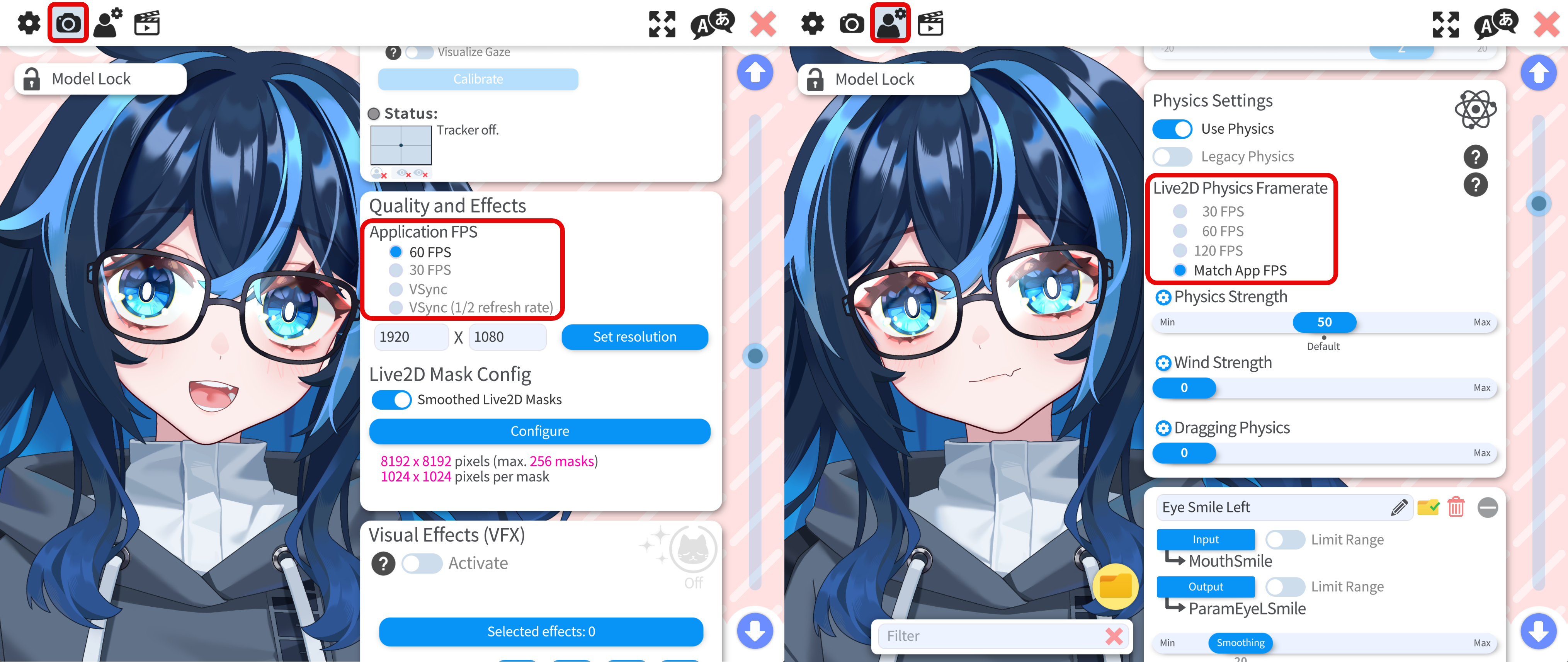
Match Application FPS is not the same as setting Live2D physics Framerate to 60 FPS, even when the app is already running at 60 FPS. The recommended pair above keeps application and physics timing aligned the way Cubism Editor expects.
If you set physics to 60 FPS instead of Match Application FPS, fast movement can show a small amount of extra lag. The difference is subtle but easy to spot once you know what to look for. The above setting will make sure the physics behave exactly the same as the physics in Live2D Cubism Editor (the rigger of the model sees when rigging the model).