Basic Setup
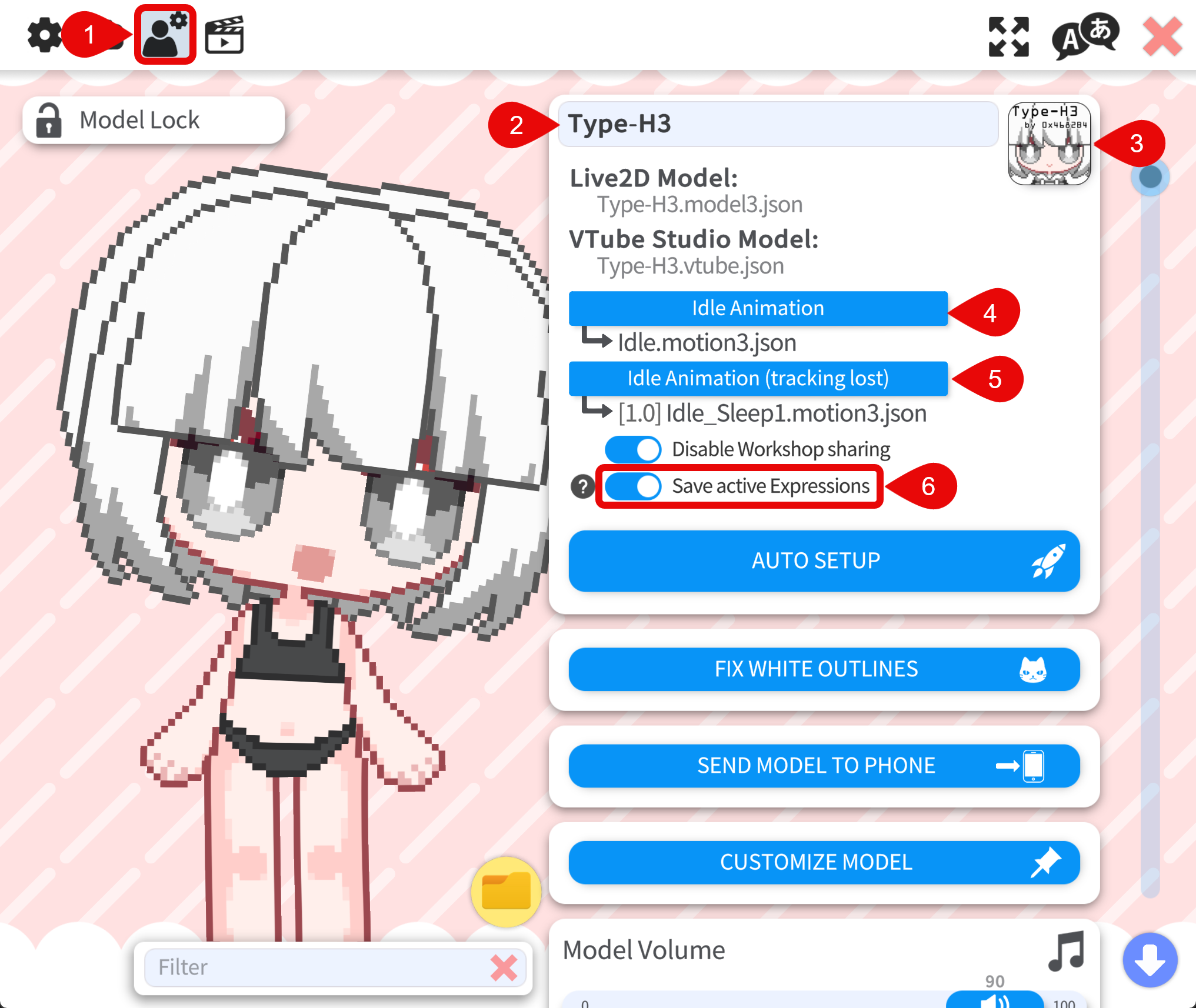
For most models, basic setup is already configured and you do not need to change it. You may still want to review it when a package includes multiple idle animations or lost-tracking idle clips and you prefer a different default.
Edit basic setup
- Open the Model Settings tab. Basic setup appears at the top of the panel.
- Model name — Rename the model in VTube Studio. For customizable models, you may want the name to match your character.
- Model icon — Replace the icon by overwriting
icon.pngin the model folder, or add a new icon PNG in that folder, click the icon slot in VTube Studio, and pick the file from the list. Icons should be PNG and square. - Idle animation — The idle animation of the model. If the package includes multiple idle animations, pick the one you want. If only one idle is provided, keep it assigned. Many toggle expressions rely on the idle animation to work correctly.
- Idle animation (tracking lost) — Plays when face tracking is lost. If multiple lost-tracking idles are included, choose one. To disable it, select the "-" entry in the list.
- Save active expressions — When this option is toggled on, VTube Studio remembers which expressions are active when you unload the model or close the app, and restores them the next time you load the model or restart. This is recommended for customizable models, because customization is often stored in expressions. If it is off, you will have to restore the customization with hotkeys every time you load the model.